

Telegram Bot Name and Username SEO: How to Choose the Right Name
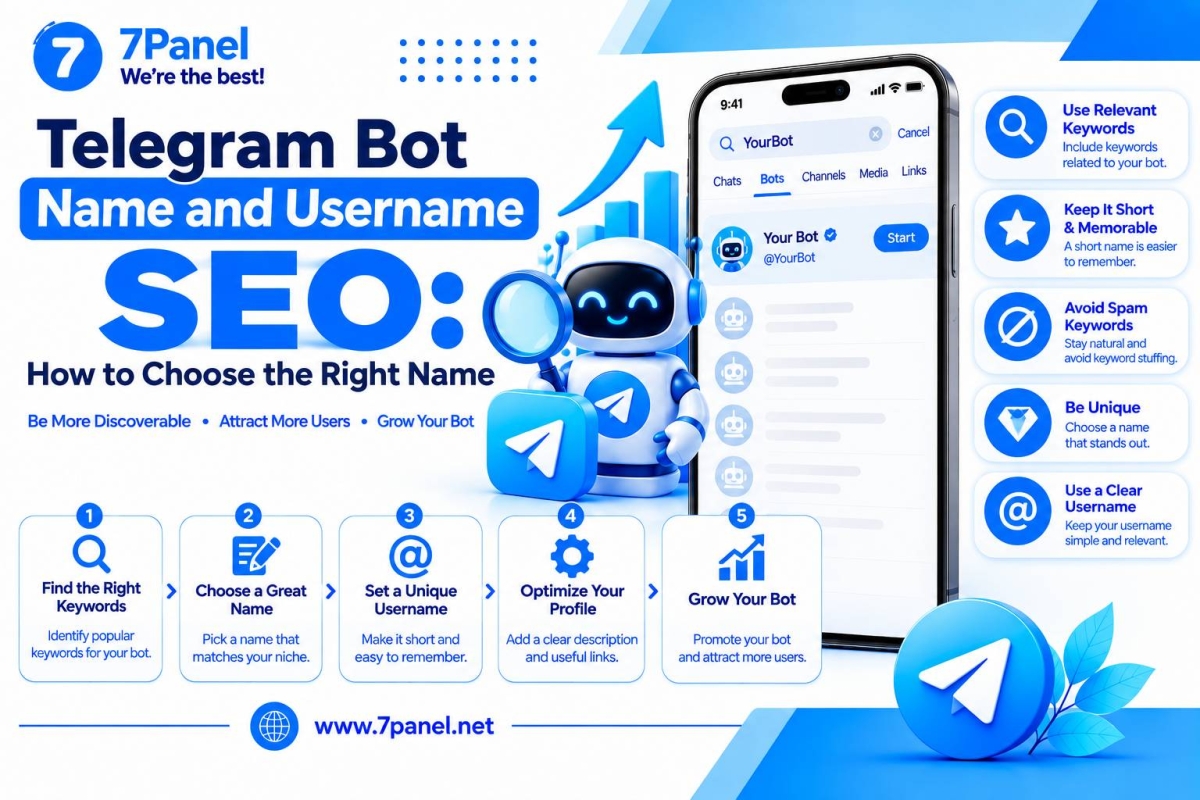
Telegram bot can provide some useful features, be used for automation of particular actions, for answering user’s questions, for providing access to a service. However, before being able to benefit from it, you have to know about its existence. The very first step in increasing your bot’s popularity is choosing the right Telegram bot name and username.
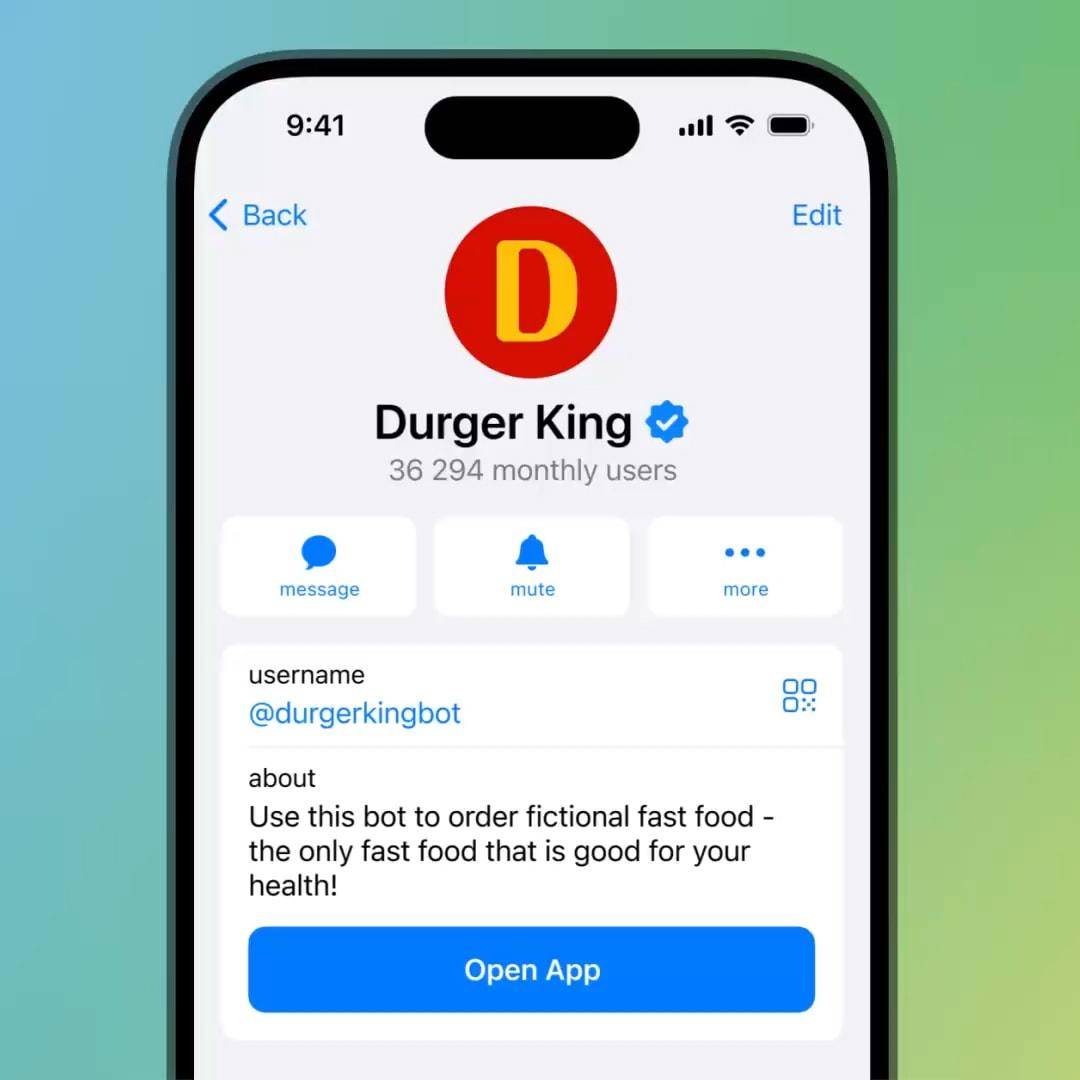
The bot’s display name describes its functionality, whereas the username is a unique nickname through which the users can easily find, mention and access the bot using Telegram link. These two concepts are quite different, and their confusion may cost you a lot.
If you are developing a Telegram bot or going to improve an already existing bot, this tutorial will help you choose the right bot name and username which will be informative and relevant at the same time. In addition, here you will learn how to incorporate keywords into your name and avoid the most common mistakes when creating names for bots.
1. Understanding the Difference Between a Telegram Bot Name and Username
The first step is understanding that a Telegram bot has two separate naming elements..
What Is a Telegram Bot Name?
The bot name is the display name shown on the bot's profile and in conversations. It is the first text many users notice when they open your bot.
For example:
- Display name: Instagram Caption Generator
- Display name: Crypto Price Alert
- Display name: Language Learning Assistant
- Display name: Online Store Support
A good display name should communicate the bot's main purpose without requiring users to guess what it does.
Unlike the username, the display name can be edited through BotFather. This gives bot owners more flexibility to improve clarity, branding, and keyword relevance over time.
What Is a Telegram Bot Username?
The username is the unique identifier associated with your bot. It is used in Telegram search, mentions, and public links.
For example:
- @CaptionMakerBot
- @CryptoAlertBot
- @LearnEnglishHelperBot
- @StoreSupportBot
A username also creates a direct Telegram address:
https://t.me/YourBotUsername
Telegram's official documentation explains that bot usernames are used for search, mentions, and t.me links. This makes the username an important part of your bot's identity and accessibility.
Important: A bot's display name and username should support the same purpose. If your display name describes a crypto alert service but the username looks like an unrelated gaming bot, users may find the identity confusing.
2. Why Telegram Bot Name SEO Matters
Choosing a name is not just a branding decision. It also affects how easily people can understand, recognize, and search for your bot.
Consider someone searching Telegram for a bot that converts images into different formats.
A bot called "My Useful Tool" does not immediately explain its purpose. A name such as "Image Converter Bot" is much clearer.
A descriptive name can help in several ways:
Clear Topic Identification
When your bot name includes a relevant description of its main function, users can understand its purpose more quickly.
For example:
- PDF Converter Bot
- Currency Exchange Bot
- Weather Forecast Bot
- Telegram File Search Bot
These names communicate a specific use case instead of relying on vague branding.
Better Keyword Relevance
Using an appropriate keyword in the bot’s name could help to make its theme more clear to users.
For instance, when your bot serves the purpose of checking crypto price information for users, keywords like “Crypto,” “Price,” or “Alert” may fit into the bot’s identity.
Nevertheless, using keywords is not necessarily going to bring higher positions in Telegram search since Telegram does not share their search ranking algorithm publicly. Thus, using keywords should not be considered a ranking trick.
Stronger Recognition and Trust
A short, descriptive name is easier to remember and share. Users are also more likely to understand what they are opening before they start a conversation.
The best naming strategy combines three elements:
- Relevance to the bot's actual function
- Simplicity and readability
- A consistent brand identity
3. How to Choose an SEO-Friendly Telegram Bot Name
Your display name should describe the main service or purpose of your bot. It should be specific enough to communicate its function but not so long that it becomes difficult to read.
Use the following practices when choosing a name.
Include Your Main Topic Naturally
Start by identifying the primary task your bot performs.
If the bot converts documents, "PDF Converter" is more descriptive than "Smart Assistant." If it provides weather information, "Weather Forecast" communicates the topic more clearly.
Examples:
| Bot Purpose | Suggested Display Name |
|---|---|
| Document conversion | PDF Converter Bot |
| Weather information | Weather Forecast Bot |
| Cryptocurrency updates | Crypto Price Alert |
| Language learning | English Practice Bot |
| Customer assistance | Store Support Assistant |
| Image editing | AI Image Editor |
You do not need to add every possible keyword. One clear topic is usually more useful than a long list of search terms.
Put the Most Important Words First
Users should understand your bot's purpose immediately.
Compare:
- Bot for Checking Crypto Prices
- Crypto Price Checker
The second option communicates the same idea more directly.
A useful naming structure is:
Main Topic + Main Function + Optional Brand
For example:
- PDF Converter – QuickDocs
- Crypto Price Alert – CoinWatch
- English Practice – WordMate
Not every bot needs a brand suffix. Add one only when it helps distinguish your product.
Keep the Name Easy to Read
Avoid unnecessary punctuation, excessive capital letters, and decorative symbols.
Poor examples:
- BEST!!! FREE!!! CRYPTO!!! BOT
- $$$ PDF CONVERTER $$$
- Super_Mega_Ultra_Tool_2026
Better examples:
- Crypto Price Alert
- Free PDF Converter
- Smart File Manager
A clean name looks more professional and is easier to recognize in Telegram conversations and search results.
Avoid Misleading Keywords
Do not use popular keywords simply because they receive search interest.
If your bot only provides weather updates, adding terms such as "Crypto Trading" or "Instagram Followers" creates an inaccurate identity.
Your name should describe what the bot actually does. A mismatch between the name and the bot's functionality can confuse users and damage trust.
4. How to Choose the Best Telegram Bot Username
Choosing a username requires more care than choosing a display name.
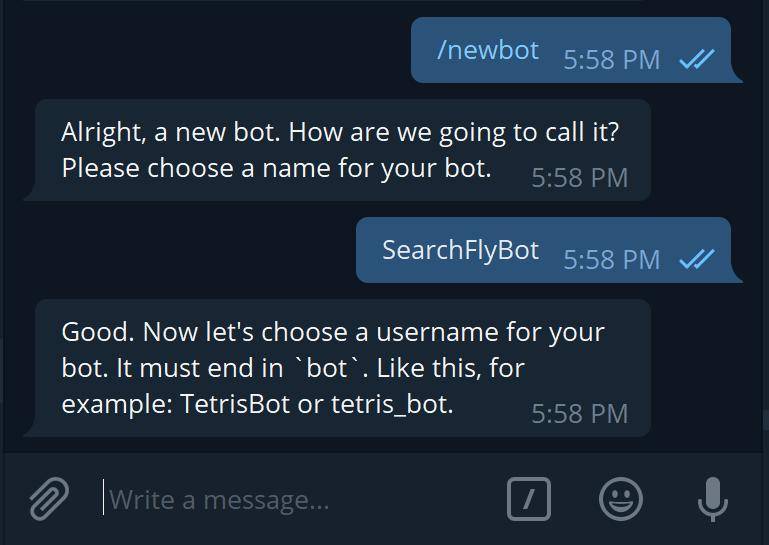
According to Telegram's official bot documentation, standard bot usernames must:
- Be between 5 and 32 characters long.
- Use Latin letters, numbers, and underscores.
- End with the word
bot. - Be unique and available.
- Be treated as case-insensitive.
For example:
- @PDFConverterBot
- @CryptoAlertBot
- @WeatherHelperBot
- @EnglishPracticeBot
Telegram also states that a bot username cannot normally be changed after creation. This is why you should check your username carefully before confirming it through BotFather.
Keep the Username Short and Memorable
A username should be easy to type, pronounce, and share.
Compare:
- @BestFreeOnlinePdfConverterServiceBot
- @PDFConvertBot
The shorter option is easier to remember and less likely to be typed incorrectly.
You do not need to include every keyword in your username. Choose the most important term that identifies your bot.
Use a Relevant Keyword
If your bot focuses on one specific service, including that service in the username can make its purpose easier to recognize.
Examples:
| Main Topic | Username Example |
|---|---|
| PDF conversion | @PDFConverterBot |
| Crypto alerts | @CryptoAlertBot |
| Weather updates | @WeatherUpdateBot |
| English learning | @EnglishTutorBot |
| Image editing | @ImageEditorBot |
| File management | @FileManagerBot |
These are naming examples only. Actual username availability must be checked in Telegram.
Avoid Random Numbers and Unnecessary Characters
Numbers may be useful when they are part of your brand or product identity. However, random numbers can make a username look less memorable.
For example:
- Less memorable: @PDFConverter839274Bot
- Cleaner: @PDFConverterBot
If the preferred username is unavailable, try a meaningful variation rather than adding a random sequence.
Possible alternatives include:
- @MyPDFConverterBot
- @QuickPDFConvertBot
- @PDFHelperBot
The goal is to preserve clarity while creating a unique username.
5. Should You Use Keywords in Both the Bot Name and Username?
Using a relevant keyword in both fields can create a consistent identity, but repeating the same phrase is not always necessary.
For example:
Display Name: Crypto Price Alerts
Username: @CryptoAlertBot
Both elements communicate the same topic without being identical.
This is generally a better approach than creating a display name and username that contain long, repetitive keyword combinations.
Think about the role of each field:
- Display name: Explain what the bot does.
- Username: Provide a short, recognizable identifier.
- Description: Explain the bot's features and benefits.
- About text: Give users a brief reminder of the bot's purpose.
Each element should add useful information instead of repeating the same words unnecessarily.
6. How to Write a Telegram Bot Description That Supports Discoverability
A good name helps users identify your bot, but the description helps them understand why they should use it.
Telegram provides separate fields for the bot description and the shorter About text. You can manage these settings through BotFather.
Your description should answer three basic questions:
- What does the bot do?
- Who is it designed for?
- What can users do after starting it?
For example, a PDF converter bot could use this description:
"Convert PDF files quickly and manage your documents directly through Telegram. Send a supported file to get started."
A crypto alert bot could use:
"Track cryptocurrency prices and receive market alerts directly in Telegram. Choose your preferred assets and notification settings."
Write for Users, Not Just Keywords
Don’t describe your bot using search terms which appear repeatedly without any explanation of the service provided.
Example:
"PDF converter, free PDF bot, best PDF tool, PDF online converter, PDF file bot."
Good example:
"The bot will be able to convert supported documents into PDF files right within Telegram. Just upload the file and follow the instructions."
Keep the About Text Short
The About section is a brief introduction displayed on the bot's profile.
For example:
"Convert documents into PDF files directly in Telegram."
Or:
"Get cryptocurrency price updates and personalized alerts."
Use this field to communicate the bot's main benefit in one concise sentence.
7. Common Telegram Bot Naming Mistakes to Avoid
Even a useful bot can look unprofessional if its name and username are poorly selected.
Avoid these common mistakes:
1. Using a Generic Display Name
Names such as "My Bot," "New Assistant," or "Super Tool" do not communicate a clear purpose.
Choose a name that describes the primary function of your bot.
2. Adding Too Many Keywords
A name such as "Free Best PDF Converter File Manager Online Bot" looks unnatural and is difficult to understand.
Focus on the main topic and remove unnecessary words.
3. Choosing a Complicated Username
Long usernames, random numbers, and unusual combinations can make your bot harder to remember.
Prefer a simple and readable username.
4. Using an Unrelated Username
Your display name and username should represent the same product or service.
If users see different topics in these two fields, they may question whether they have found the correct bot.
5. Changing the Display Name Too Frequently
Your display name can be updated, but frequent changes may make it harder for existing users to recognize your bot.
Choose a suitable name early and update it only when there is a genuine reason, such as a product rebrand or a change in functionality.
6. Forgetting the Username Cannot Normally Be Changed
This is one of the most important points when creating a new bot.
Unlike the display name, a standard bot username cannot normally be edited after creation. Check spelling, keyword choice, brand consistency, and availability before submitting it to BotFather.
8. How to Set or Update Your Telegram Bot Name and Username
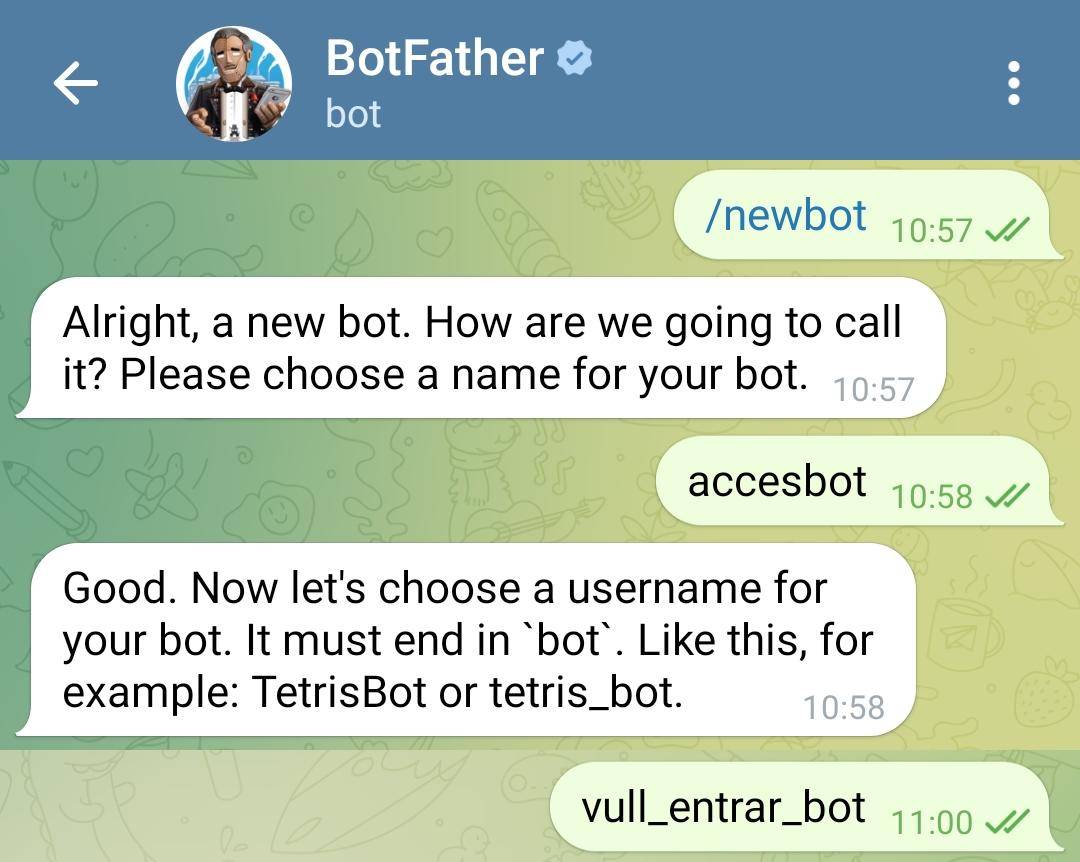
Telegram uses its official @BotFather bot to create and manage bots.
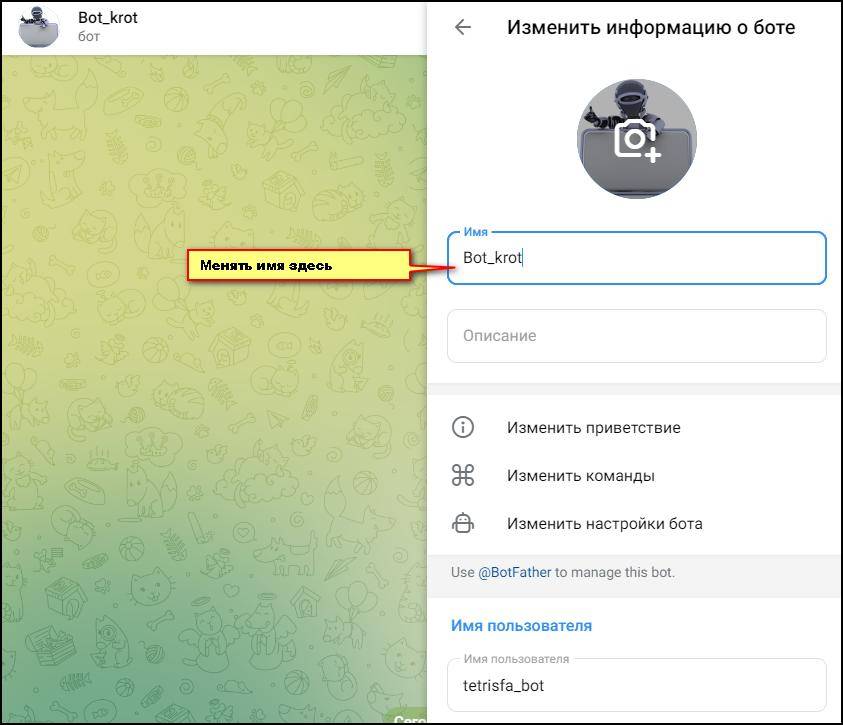
Follow these steps when creating a new bot:
- Open Telegram and search for
@BotFather. - Start a conversation with BotFather.
- Send the
/newbotcommand. - Enter your preferred display name.
- Choose an available username that follows Telegram's requirements.
- Confirm the username and complete the creation process.
- Configure your bot description, About text, and profile picture.
If you already have a bot, you can manage its settings through BotFather.
Useful commands include:
/setname– Update the bot's display name./setdescription– Update the bot description./setabouttext– Update the short About text./setuserpic– Change the bot's profile picture./mybots– View and manage your bots.
Remember that /setname changes the display name, not the username.
For the latest technical details and naming requirements, refer to Telegram's official documentation.
9. How to Improve Your Telegram Bot's Overall Search Visibility
A well-chosen name and username create a clear foundation, but discoverability should not depend on naming alone.
Consider these additional practices:
Keep Your Bot's Identity Consistent
Use the same main topic across your display name, username, description, profile image, and external promotional materials.
For example, if your bot is called "Weather Forecast Bot," its profile description and promotional content should clearly relate to weather information.
Make the Bot Useful After Users Start It
A bot that has a descriptive name but provides a confusing first experience may fail to retain users.
Make the /start message clear and explain the next action. Provide useful commands, simple navigation, and instructions that match the bot's purpose.
Use a Professional Profile Picture
Your profile picture should be recognizable at a small size. Use a simple icon or logo related to the bot's function.
Avoid images with too much text or complicated details.
Share the Correct Bot Link
Use your official t.me link when promoting your bot.
For example:
https://t.me/YourBotUsername
Check that the link opens the correct bot and that the username is written accurately.
Maintain a Consistent User Experience
Make sure your bot's features match what its name and description promise. Users should not have to guess how to use it or search through unrelated commands.
These practices improve clarity and the overall experience for people discovering your bot. They should not be interpreted as confirmed Telegram ranking factors, because Telegram does not publish a complete explanation of its bot-search ranking system.
10. Telegram Bot Name SEO Checklist
Before publishing or updating your bot, review the following checklist:
The display name clearly describes the bot's main function.
The primary topic appears naturally in the name where appropriate.
The name is short, readable, and easy to remember.
The username is available and follows Telegram's requirements.
The username ends with
bot.The username does not contain unnecessary numbers or characters.
The display name and username represent the same topic.
The bot description explains its actual features.
The About text provides a concise introduction.
The profile picture is recognizable and relevant.
The
/startmessage explains how to use the bot.The public t.me link works correctly.
Completing this checklist will help you create a more consistent and professional Telegram bot identity.
Frequently Asked Questions
A descriptive bot name helps users understand the bot's topic and may improve its relevance to searches. However, Telegram does not publicly disclose a complete ranking formula, so using a keyword in the name does not guarantee a specific search position.
The bot name is the display name shown on the profile and in conversations. The username is the unique identifier used for search, mentions, and t.me links.
Telegram's standard bot documentation states that a bot username cannot normally be changed after creation. Choose it carefully before confirming it through BotFather.
A good username should be short, readable, relevant to the bot's purpose, and easy to remember. Standard bot usernames must be 5–32 characters long, use Latin letters, numbers, and underscores, and end with bot.
You can include a relevant keyword in the display name when it accurately describes the bot's main function. Avoid keyword stuffing or adding unrelated terms.
No. Telegram bot usernames are not case-sensitive. Different capitalization does not create a different username.
Start with a clear display name, a relevant username, an accurate description, and a recognizable profile picture. Then make sure your bot provides a useful experience and that its public link is shared correctly.
Final Thoughts
Picking an appropriate name and username for a Telegram bot is a crucial part of making your bot recognized and discoverable.
An effective display name gives you a way to explain what the bot does, while an appropriately chosen username will help people find your bot, address and share it. Everything from your description and About text to your profile picture and first message should convey the same identity.
Rather than attempting to fit in any keyword you can think of, it is better to concentrate on relevancy, conciseness and coherence of the information conveyed.


Join us on Telegram
Get updates and tips on our channel.
Article tools
Share this article