
How to Track Telegram Search Rankings: A Practical Guide

Monitoring your Telegram channel's search ranking will give you information on whether your channel is discovered by people who look for relevant information. In addition, it will help you analyze changes in visibility, compare keyword positions, and see the effectiveness of your channel optimization efforts.
But unfortunately, there is no official ranking dashboard in Telegram that would allow you to track your channel's ranking over time. That's why you have to develop your own way to track search results.
Here you will learn how to track Telegram search rankings and measure channel visibility.
1. Understand What You Are Tracking
Before checking your position, understand the difference between being discoverable and ranking for a keyword.
For example, your channel might appear when someone searches for its exact username but remain difficult to find when users search for a broader term such as "technology news."
You should monitor three types of searches:
- Exact username searches: Check whether your channel appears when users search for its username.
- Channel name searches: Search the complete channel name and important parts of it.
- Topic keyword searches: Use relevant phrases that potential subscribers might search for.
Tracking these separately gives you a more realistic picture of your channel's visibility.
2. Search for Your Channel Manually
The simplest way to track Telegram search rankings is through Telegram's built-in search.
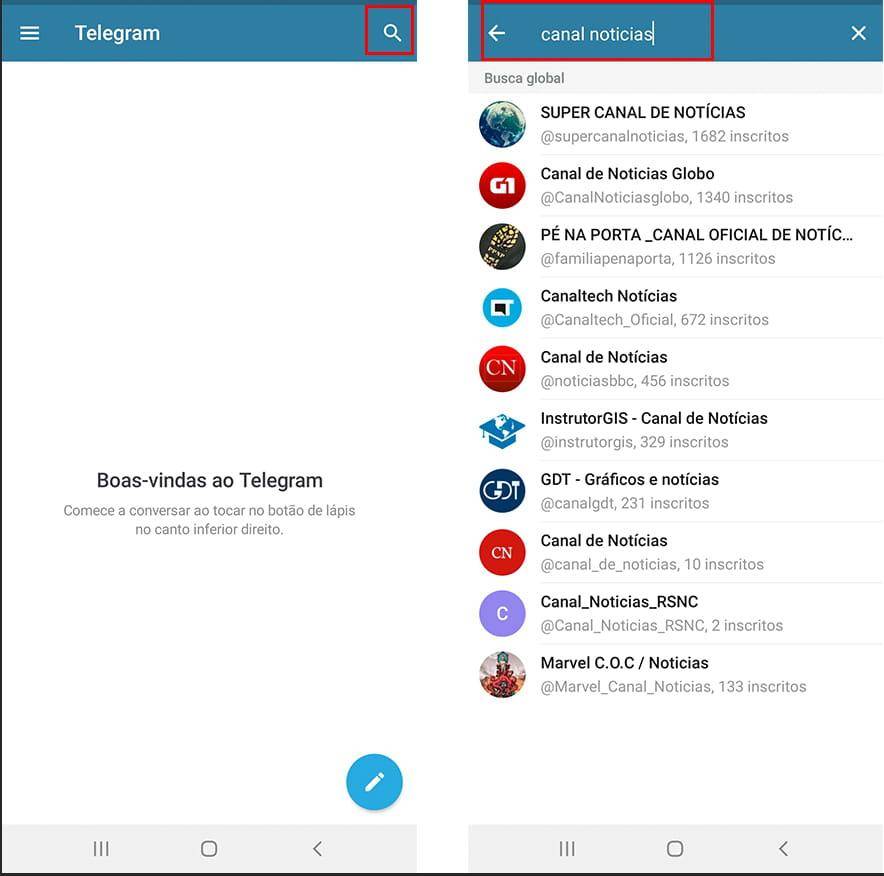
Follow these steps:
- Open Telegram on your mobile device or desktop.
- Use the main search bar.
- Enter your channel's exact username.
- Record whether your channel appears.
- Repeat the process using your channel name.
- Search for your main topic keywords.
- Record your channel's position among the visible results.
For consistent tracking, use the same device, account, and search method whenever possible.
Important: Telegram results may vary depending on the search query, account, location, and other contextual factors. A result observed from one account should not be treated as a universal ranking position.
3. Create a Telegram Keyword Tracking List
Do not track random keywords. Select a small group of search terms directly related to your channel's topic.
For example, a technology channel might monitor:
- Technology News
- Latest Tech Updates
- Artificial Intelligence News
- Mobile Technology
Start with three to five keywords. This makes tracking easier and helps you identify which searches are bringing better visibility.
Avoid changing your keyword list every few days. Keep the same keywords for several weeks so that your comparisons remain meaningful.
4. Record Your Search Positions Regularly
A ranking check is only useful when you save the results.
Create a spreadsheet with the following columns:
| Date | Search Keyword | Channel Found? | Observed Position | Notes |
|---|---|---|---|---|
| Nov 1 | Technology News | Yes | 5 | Initial check |
| Nov 8 | Technology News | Yes | 3 | Improved visibility |
| Nov 15 | Technology News | No | — | Not visible |
The numbers above are examples, not actual Telegram ranking data.
Check your selected keywords once or twice per week. Avoid making conclusions based on a single search because results can change.
If your channel is not visible within the results you can inspect, record it as "Not found" rather than assigning an estimated position.
5. Use Third-Party Telegram Analytics Tools
Third-party platforms can help you understand your channel's performance and compare it with other public channels.
Tools such as TGStat and Telemetr provide different types of public channel analytics, depending on their available coverage and features.
You can use these platforms to review:
- Subscriber growth over time
- Average post views
- Engagement trends
- Channel statistics
- Public channel comparisons
However, there is an important distinction: channel analytics are not the same as Telegram search ranking data.
A channel with increasing subscribers or post views has improved its audience metrics, but this does not automatically prove that its position in Telegram search has improved.
Use analytics tools as supporting sources, not as definitive Telegram ranking trackers.
6. Monitor Search Visibility After Channel Changes
When you update your channel name, username, or description, record the date of the change.
Then check your selected keywords regularly to see whether your channel's discoverability changes.
For a useful comparison:
- Save your search results before making an update.
- Change one important element at a time.
- Continue monitoring the same keywords.
- Compare the results over several weeks.
- Record other changes that might influence your observations.
Avoid changing your channel name or username repeatedly just to test rankings. Frequent changes make it harder to understand what actually affected your visibility.
7. Track Competitors Alongside Your Channel
Monitoring similar public channels can provide useful context.
Choose three to five channels that target the same audience or topic. Search for them using the same keywords and record their visibility.
Compare:
- Which channels appear consistently?
- Which keywords show your competitors?
- Does your channel appear for the same searches?
- Are competitors becoming more visible over time?
This process helps you identify keyword opportunities and understand how your channel performs within its niche.
Remember that competitor visibility does not reveal the exact ranking formula used by Telegram.
8. How Often Should You Track Telegram Rankings?
For most public channels, checking rankings once or twice per week is a reasonable starting point.
A simple tracking schedule could look like this:
- Weekly: Check your main search keywords.
- Every two weeks: Compare your channel with selected competitors.
- Monthly: Review subscriber growth, post views, and search visibility together.
Do not react to every small movement. Look for consistent patterns across multiple checks before changing your channel strategy.
Frequently Asked Questions
There is no publicly available official Telegram dashboard that provides a complete ranking history for every channel and keyword. Some third-party services offer monitoring features, but you should verify whether they measure actual Telegram search positions or only channel statistics.
TGStat provides channel analytics and discovery-related data, but you should not assume that every metric represents your exact position in Telegram's native search results.
Search results may differ between accounts and search contexts. Differences in queries, location, and personalization can affect what users see.
Telegram does not publish a guaranteed timeline for search ranking changes. Track your channel consistently over several weeks instead of expecting immediate results.
Conclusion
When monitoring the Telegram search rankings, you need to do much more than just verifying that your channel is there once. Keywords, searching, recording, and channel analytics are all necessary for tracking the search rankings properly.
Use your channel username, name, and three to five topic-related keywords as a starting point for the ranking monitoring.
Even though Telegram does not have a fully developed public ranking tracker, a proper monitoring system can be established easily.





Join us on Telegram
Get updates and tips on our channel.
Article tools
Share this article